Best Halloween Fonts and How to Use Them in Canva for Click Worthy Pinterest Pins
As the smell of autumn air rolls in and pumpkin spice returns to the coffee shops Halloween creeps closer. With it comes a golden opportunity for bloggers, content creators and small businesses to get seasonal with their marketing. One of the easiest ways to tap into the Halloween spirit is with themed visuals and nothing sets the tone quite like a perfectly spooky font.
If you’re creating Pinterest Pins in Canva and want to stop the scroll, the right Halloween fonts can instantly add eerie charm, whimsy, or even a touch of vintage horror to your design. In this blog post, I’ll walk you through the best Halloween fonts available in Canva, how to use them effectively, and share a few top tips for creating Pins that truly stand out.
Let’s carve up the jack-o’-lantern and get into it!
Why Fonts Matter, especially for Pinterest
Before we jump into the fonts themselves, let’s talk about why your font choices matter so much especially on Pinterest.
Pinterest is a highly visual platform, and your Pin only has a second or two to grab attention. Fonts are key to this. The right font can:
Instantly convey a seasonal theme (like Halloween).
Make your message readable at a glance, even on a mobile screen.
Create emotion or atmosphere whether that’s eerie, cute, mysterious, or bold.
Make your content more memorable and shareable.
The goal is to stop someone mid scroll and make them think “Ooh, what’s this?”
Now, let’s look at the best Halloween fonts Canva has to offer.
The Best Halloween Fonts
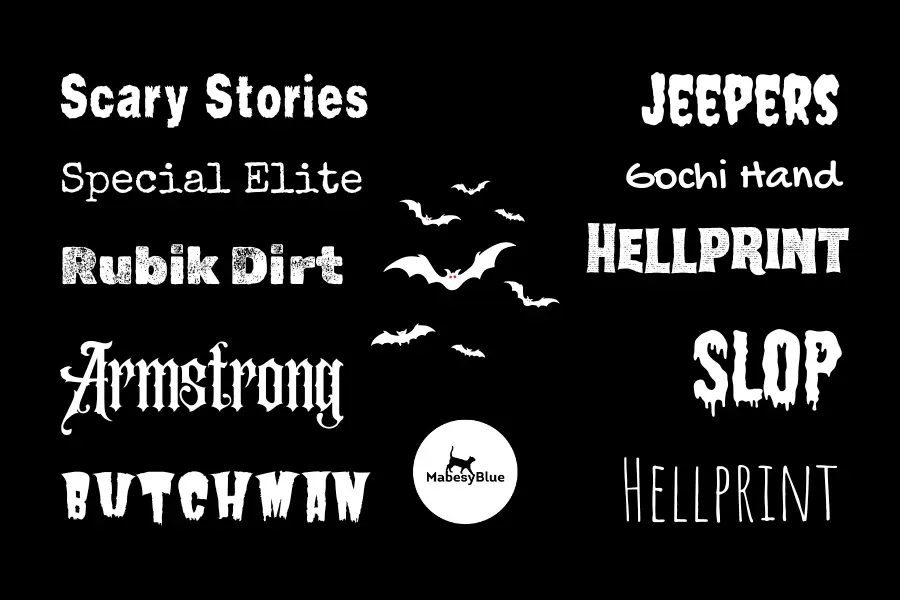
Here’s a handpicked selection of Halloween ready fonts in Canva that will help you cast the right spell on your audience.
1. Scary Stories
Perfect for: Classic creepy tales and eerie narratives
Style: Gothic, sharp, and theatrical
Use with: Dark gradients, night skies, or candle-lit visuals
Scary Stories lives up to its name—it looks like it was pulled straight from the cover of a chilling tale. Use it when you want to give your design an unmistakable horror vibe with a literary twist. Available in Canva.
2. Gochi Hand
Perfect for: Kid friendly Halloween themes
Style: Handwritten, casual, playful
Use with: Pastel orange, purple and ghostly whites
Great for Halloween craft ideas, party invitations, or content aimed at parents and children. It’s friendly without losing that spooky touch. Download here
3. Special Elite
Perfect for: Typewriter, vintage mystery look
Style: Worn out typewriter effect
Use with: Textures like paper, parchment or old photos
Ideal for true crime Halloween themed posts, gothic stories, or anything that leans towards the eerie and historical. Download Here
4. Rubik Dirt
Perfect for: Grungy, haunted visuals
Style: Distressed and gritty
Use with: Faded colours, grainy textures
This is a good one for grunge aesthetics think urban legends, scary short stories, or edgy costume ideas. Download Here
5. Butcherman
Perfect for: Zombie themed content
Style: Cartoonish horror with a jagged edge
Use with: Neon green or black backgrounds
Fun, loud, and definitely Halloween ready. Great for party posters or pins aimed at a younger crowd. Available in Canva.
6. Armstrong
Perfect for: Elegant, moody Halloween themes
Style: Sophisticated serif with a slightly retro edge
Use with: Dusty oranges, deep purples, and atmospheric imagery
If your Halloween content leans more towards cosy autumn aesthetics with a witchy undertone, Armstrong is perfect. Think moon rituals, spell jars and tarot spreads. Available in Canva.
7. Shlop
Perfect for: Classic horror vibes
Style: Thick, dripping and gooey
Use with: Blood-red or black backgrounds
Shlop oozes horror film nostalgia. It’s bold, messy and makes an instant impact use it for dramatic headlines, party titles or haunted house promotions. Available in Canva.
8. Jeepers
Perfect for: Light-hearted spooky content
Style: Wobbly, hand-drawn and cartoonish
Use with: Bright Halloween colours like orange, green and purple
Jeepers is brilliant for fun Halloween DIYs, kids’ costume ideas, or anything with a touch of spooky humour. Pair it with playful icons like ghosts or bats. Available in Canva.
9. Hellprint
Perfect for: Edgy, gothic or underground looks
Style: Harsh, rugged, and heavy metal-inspired
Use with: Grungy textures, dark reds and greys
Use Hellprint for horror stories, Halloween playlists, or more alternative content. It’s bold and unapologetic – great when you want your Pin to scream rebellion. Available in Canva.
10. Amatic SC
Perfect for: Witchy, hand-drawn aesthetics
Style: Tall, skinny handwritten
Use with: Illustrations, doodles, or line art
Ideal for tarot content, witchy DIYs, or anything that leans into the whimsical side of Halloween. Available in Canva.
How to Use Halloween Fonts in Canva for Pinterest Success
Now that you’ve got your font arsenal ready, here’s how to use them in Canva to create Pins that actually get noticed and clicked.
1. Start With a Strong Headline
Your font choice needs to support a clear, compelling message. Think of phrases like:
“10 Last Minute Halloween Costumes”
“Spooky Treats Even Muggles Can Make”
“Easy DIY Decor to Haunt Your Home”
Use your Halloween font for the main headline, and keep any subtext in something simpler like Open Sans, Lato or Montserrat for readability.
2. Stick to Two Fonts Max
Using more than two fonts can quickly make your Pin look chaotic. One decorative font for the heading and a clean, sans serif font for any body text is a solid combo.
3. Use Colour Wisely
Pair your font with Halloween themed colours:
Pumpkin orange
Ghost white
Blood red
Witchy purple
Graveyard grey
Midnight black
Use contrast to your advantage dark fonts on a light background (or vice versa) are much easier to read at a glance.
4. Add On Brand Imagery
Match your fonts with photos, illustrations or icons that match the theme:
Pumpkins, bats, cauldrons
Foggy forests or spooky silhouettes
Halloween party flat lays
Canva has loads of free and Pro elements you can drag straight in.
5. Keep It Mobile Friendly
Most Pinterest users browse on their phones. That means:
Large, legible fonts
Clear hierarchy (headline > subhead > image)
Simple, uncluttered designs
Once you’ve created your Pin, zoom out to see if the text is still readable. If you can’t read it from a thumbnail view, your audience won’t either.
6. Use Canva’s Brand Kit (if you have Pro)
If you’re running a blog or business, Canva Pro’s Brand Kit is brilliant for keeping things cohesive. You can upload your colour palette and brand fonts and then swap in Halloween themed fonts just for the season without losing your core aesthetic.
Extra Pinterest Design Tips for Halloween Pins
Here are a few bonus tricks to take your Halloween Pins even further:
Use Motion:
Animated Pins stand out. Try subtle text fades or element movement using Canva’s animation tools.
Seasonal Templates:
Canva has hundreds of Halloween templates don’t reinvent the wheel. Search “Halloween Pinterest Pin” in the templates section to get started quickly.
Include a Call to Action:
Tell people what to do next: “Read more”, “Save for later”, “Get the recipe”. Clear CTAs boost click throughs.
Create a Series:
Design multiple Pins using the same layout but different headlines (e.g. “Scary Snacks”, “Creepy Cocktails”, “Pumpkin Party Ideas”). This builds visual consistency and brand recognition.
Let Your Fonts Do the (Witch) Talking
You don’t need a design degree to create striking, scroll stopping Pinterest Pins for Halloween just the right font, some clever design principles and a little seasonal flair.
Fonts like Creepster and Butcherman bring the fright night fun, while more understated choices like Cabinet Grotesk or Special Elite can add a subtle spooky edge without going full skeletons and spiderwebs.
So go ahead open Canva, pick your favourite Halloween font and create something devilishly good. Happy haunting!